
HDBhelper - Calc 4 Devs1.8.0 - Get APK
You'll be able to download in few seconds.
Publisher Description
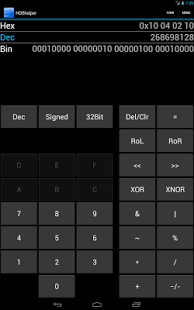
HDBHelper is the perfect Calculator for Developers! HDB stands for Hex Dec Bin, and it will help you a lot! ;-)
This app calculates as a Code would do. Example: An 8 Bit Unsigned Integer: 254+3=1
HDBHelper can display you up to 32bit long integers in Hexadecimal, Decimal and Binary at once. You can switch between signed and unsigned, even during the calculation. This way you will always know how your value changes due to Interpretation.
You can also simulate what happens if you mix up Endianess: If a Sender uses Big Endianess, the Receiver interprets it as Little Endianess. 192 (0x00C0) would get to 49152 (0xC000)
Features:
- No Ads!
- Hardware Keyboard support (Build in, Bluetooth, USB, ...)
- Bit Length: 8bit, 16bit, 32bit
- Signed, Unsigned
- Type in Bin, Dec, Hex
- Endianness: MSB First (Big Endian), MSB Last (Little Endian), Reverse Little Endian (DIP-Switches etc.)
- Simulate Endianess errors
- Arithmetic operations: addition, subtraction, multiplication, division, modulu
- Bit operations: shifting, rolling, NOT, AND, OR, XOR, XNOR
- Three layouts: Simple, Advanced and Display
- Languages: English and German
- Long Press "Del/Clr" to Clear
- Long Press "-" to enter Negative Value
- Supporting Devices from very small (ldpi) to big (xhdpi) and Tablets with Android 3.2+ in portrait and landscape
- Display 8 Bit Values in ASCII
- Toggle Bits by tapping
- Copy to Clipboard
About HDBhelper - Calc 4 Devs
The company that develops HDBhelper - Calc 4 Devs is kp.dev. The latest version released by its developer is 1.8.0.
To install HDBhelper - Calc 4 Devs on your Android device, just click the green Continue To App button above to start the installation process. The app is listed on our website since 2013-08-10 and was downloaded 0 times. We have already checked if the download link is safe, however for your own protection we recommend that you scan the downloaded app with your antivirus. Your antivirus may detect the HDBhelper - Calc 4 Devs as malware as malware if the download link to com.kpdev.hdbhelper is broken.
How to install HDBhelper - Calc 4 Devs on your Android device:
- Click on the Continue To App button on our website. This will redirect you to Google Play.
- Once the HDBhelper - Calc 4 Devs is shown in the Google Play listing of your Android device, you can start its download and installation. Tap on the Install button located below the search bar and to the right of the app icon.
- A pop-up window with the permissions required by HDBhelper - Calc 4 Devs will be shown. Click on Accept to continue the process.
- HDBhelper - Calc 4 Devs will be downloaded onto your device, displaying a progress. Once the download completes, the installation will start and you'll get a notification after the installation is finished.
Program Details
System requirements
Download information
Pricing
Version History
version 1.8.0
posted on 2013-08-10
New Features:,Use your Hardware Keyboard to enter the following Keys 0-9, A-F, +-*/=,If your app is English, a standard qwerty Keyboard is assumed. In German a qwertz Keyboard Layout is assumed,You want another Keyboard supported? Write me an eMail!
version 1.6.0
posted on 2013-06-08
Several fixes and updates
Disclaimer
External Download
We do not host HDBhelper - Calc 4 Devs on our servers. We did not scan it for viruses, adware, spyware or other type of malware. This app is hosted by Galad and passed their terms and conditions to be listed there. We recommend caution when installing it.
The APK Download link for HDBhelper - Calc 4 Devs is provided to you by apps112.com without any warranties, representations or guarantees of any kind, so access it at your own risk.
If you have questions regarding this particular app contact the publisher directly. For questions about the functionalities of apps112.com contact us.
